
Manual
Veltrea Syslog Server (package name vlt-syslogd) receives
syslog over UDP and displays it. This manual covers v0.4.0.
1. Which one do I install
There are three ways to run this. Decide what you are trying to do first. If you are unsure, take Portable: no service, no admin rights, running the moment you open it.
| What you want | What to install | Sections |
|---|---|---|
| Just try it / keep it on one machine | Portable only (no install) | 2 → 3 |
| Collect continuously (server use) | Server (resident) + Console (the view) | 4 → 5 → 6 → 7 → 8 |
| Look at a Server that already runs | Console only | 7 |
The three pieces
| Name | Executable | Role |
|---|---|---|
| Portable | vlt-syslogd-portable |
Self-contained GUI that opens the UDP socket itself. |
| Server | vlt-syslogd-srv |
Headless engine. Receives over UDP and streams to Console. |
| Console | vlt-syslogd-console |
GUI that attaches to Server over TCP. |
On Windows each has a .exe suffix. Binaries are in
GitHub Releases. To build from source, see
BUILD.md; everything after the build is identical.
2. Trying Portable
Portable listens on UDP 514 by itself. Unpack it, open it, send a test message, and watch a row appear.
2.1 Windows
Unzip vlt-syslogd-portable-windows-v0.4.0.zip and double
click vlt-syslogd-portable.exe. If SmartScreen appears,
choose "More info" then "Run anyway". Windows has no privileged-port
concept, so binding 514 needs no admin rights.
$u = New-Object System.Net.Sockets.UdpClient
$b = [Text.Encoding]::UTF8.GetBytes('<132>auth: login failed')
$u.Send($b, $b.Length, '127.0.0.1', 514) | Out-Null; $u.Close()
2.2 macOS
Open vlt-syslogd-macos-portable-v0.4.0.dmg and take out
vlt-syslogd-portable.app. The macOS builds are ad-hoc
signed and not notarized, so Gatekeeper stops the first launch. Either
right click → Open once, or clear the quarantine flag.
xattr -dr com.apple.quarantine vlt-syslogd-portable.appClear the quarantine flag on the Portable variant
Portable keeps its data next to the .app. While the
quarantine flag is present, App Translocation runs the app from a
read-only copy elsewhere and that data location breaks.
printf '<34>Oct 11 22:14:15 myhost myapp: hello' | nc -u -w1 127.0.0.1 5142.3 Linux
A single ELF binary. Make it executable and run it. 514 is a
privileged port, so if the bind fails, run as root or grant
CAP_NET_BIND_SERVICE.
chmod +x vlt-syslogd-linux-x86_64-portable-v0.4.0
./vlt-syslogd-linux-x86_64-portable-v0.4.0
The GUI needs a CJK font installed to render Japanese; without one you
get tofu boxes. Install fonts-noto-cjk or equivalent.
3. Reading the log view
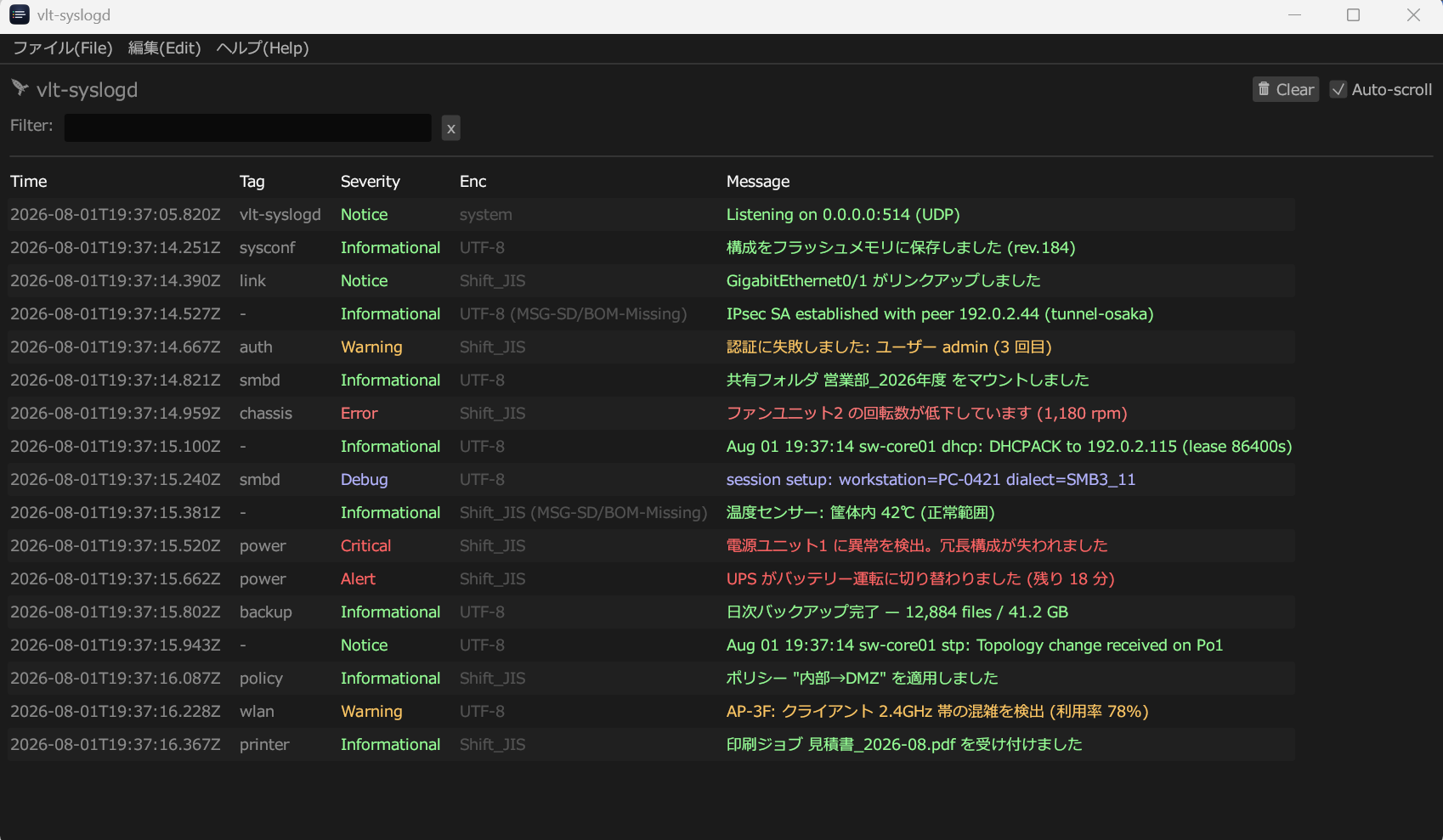
3.1 The five columns
| Column | What it holds |
|---|---|
| Time | When it was received, to the millisecond — not the timestamp the sender claimed. |
| Tag |
The tag lifted from the front of the payload. It is filled
only when there is a space-free word before the first colon,
as in <PRI>tag: message; otherwise
-.
|
| Severity | Taken from PRI: Emergency, Alert, Critical, Error, Warning, Notice, Informational, Debug — also distinguished by colour. |
| Enc | The encoding used to decode this one message, and the evidence it was chosen on. See below. |
| Message | The decoded payload. |
Filter narrows by message and tag. Unchecking Auto-scroll stops the view following new rows, which is what you want when reading one line in a busy stream. 🗑 Clear discards the rows on screen; the log files on disk are untouched.
Right clicking a row offers Copy Message (the decoded text) and Copy as Hex (the bytes exactly as they arrived). When something looks wrong, the hex tells you whether the problem is on the wire or in the display.
3.2 What the Enc column means
The encoding is decided per message, not per connection, so a Shift_JIS appliance and a UTF-8 appliance can share one port.
| Enc shows | Meaning |
|---|---|
UTF-8 / Shift_JIS |
Arrived in RFC 3164 or bare BSD framing and was decoded from the byte pattern. |
Shift_JIS (MSG-SD/BOM-Missing) |
RFC 5424 structured data declared
charset="Shift_JIS" and was believed. No BOM was
present.
|
UTF-8 (MSG-UTF8/BOM) |
No declaration, but a BOM, so it was read as UTF-8. |
UTF-8 (Implicit) |
Neither declaration nor BOM, but the bytes were valid UTF-8. |
Shift_JIS (Guess) |
No evidence at all; inferred from the bytes. |
system |
Not received at all — a line vlt-syslogd wrote itself, such as the bind result. |
3.3 Preferences
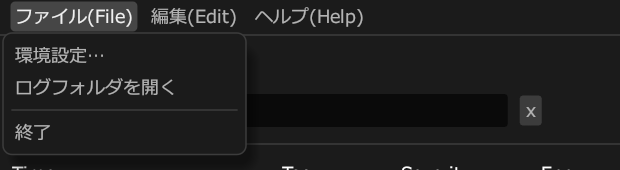
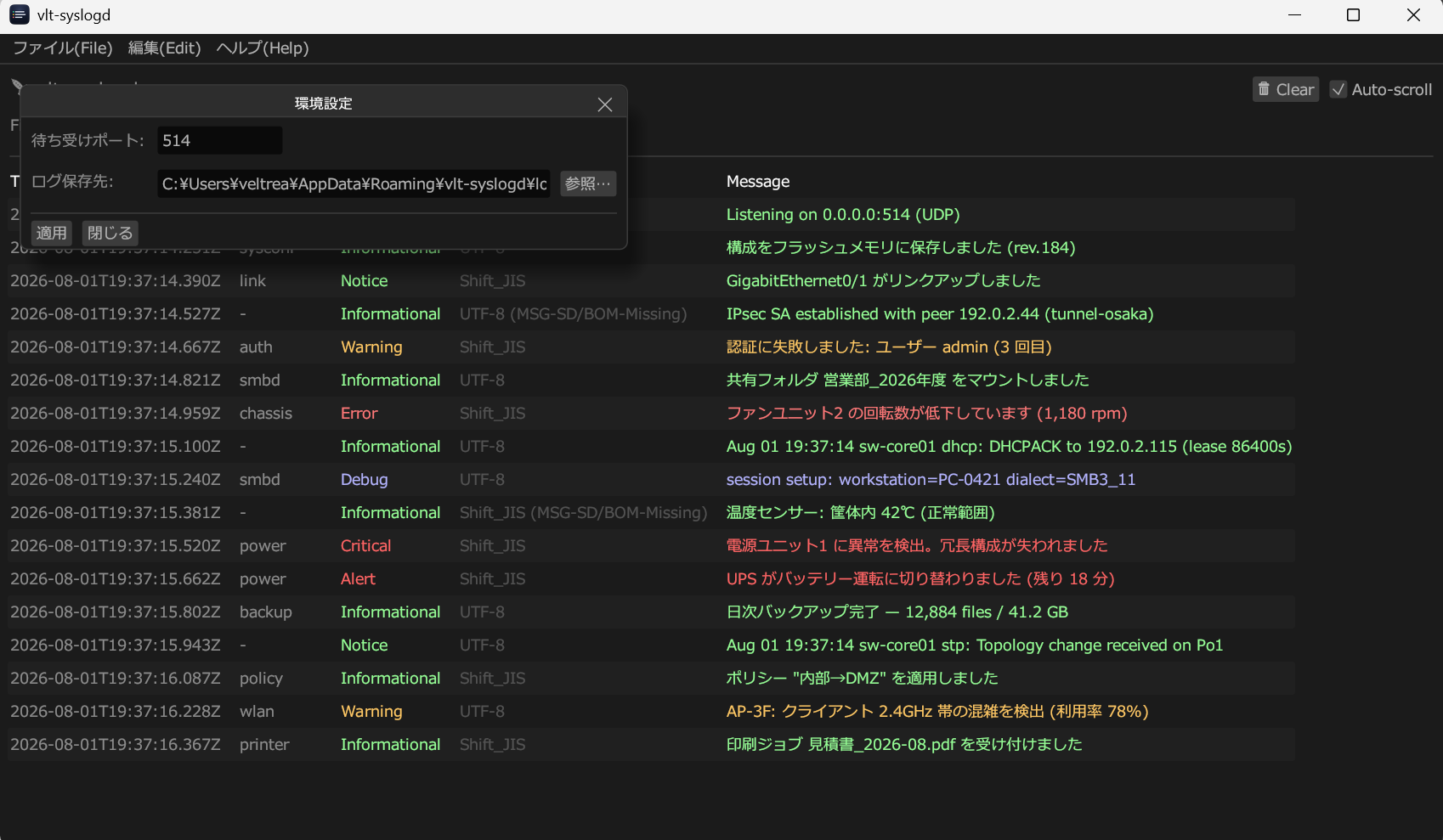
The bind result appears as the first row of the log view
(Listening on 0.0.0.0:514 (UDP)). If 514 is already held
by another process, move to a port above 1024 here and point the
sender at the same port.
The GUI listening address can also be overridden with the
VLT_SYSLOGD_BIND environment variable, for example
VLT_SYSLOGD_BIND=0.0.0.0:5514.
4. Running Server as a service
Server has no window. The bundled install script places the executable, creates the data directory, registers the service and starts it. Admin rights are needed only during install; after that it comes up with the machine.
4.1 Windows service
From an elevated PowerShell:
cd Server
powershell -ExecutionPolicy Bypass -File .\install-windows.ps1| Executable | C:\Program Files\vlt-syslogd\vlt-syslogd-srv.exe |
| Data and logs | C:\ProgramData\vlt-syslogd\ |
| Service name | vlt-syslogd-srv (startup type: automatic) |
| Check state | sc.exe query vlt-syslogd-srv |
The PowerShell scripts are deliberately ASCII-only so that a CP932 console cannot corrupt them. The prose lives here instead.
4.2 macOS / launchd
cd Server
sudo ./install-macos.sh| Executable | /usr/local/bin/vlt-syslogd-srv |
| Data and logs | /usr/local/var/vlt-syslogd/ |
| LaunchDaemon |
/Library/LaunchDaemons/com.veltrea.vlt-syslogd-srv.plist
|
| Check state |
sudo launchctl print system/com.veltrea.vlt-syslogd-srv
|
The LaunchDaemon runs as root, which is what lets it bind 514. That is why the installer asks for authentication.
4.3 Linux / systemd
cd Server
sudo ./install-linux.sh| Executable | /usr/local/bin/vlt-syslogd-srv |
| Data and logs | /var/lib/vlt-syslogd/ |
| Unit | /etc/systemd/system/vlt-syslogd-srv.service |
| Check state | systemctl status vlt-syslogd-srv.service |
| Follow logs | journalctl -u vlt-syslogd-srv.service -f |
The unit runs as root by default so that it can open 514. If you would
rather it did not, the unit file carries commented hints for a
dedicated user plus
AmbientCapabilities=CAP_NET_BIND_SERVICE.
5. The config file
Server writes config.toml into its data directory on
first run. The defaults work, so read this only when you want
to change ports or exposure.
[server]
bind_addr    = "0.0.0.0:514"        # syslog intake (UDP)
stream_addr  = "127.0.0.1:5141"     # stream to Console (TCP)
control_addr = "127.0.0.1:5142"     # control channel (TCP)

[logging]
level        = "info"
max_size_mb  = 10
keep_files   = 7
After editing, restart the service or use Console's
Apply to server (restart). The data directory location can be
overridden with VLT_SYSLOGD_DATA_DIR.
6. Network and firewall
The three ports are exposed differently on purpose.
| Port | Default bind | Reachable from |
|---|---|---|
| 514/udp (intake) | 0.0.0.0 |
Any host, so remote devices can send. |
| 5141/tcp (stream) | 127.0.0.1 |
The same host only. |
| 5142/tcp (control) | 127.0.0.1 |
The same host only. |
Both TCP channels are protected by a shared token
(<data dir>/control.token, created by the installer
owned by the admin user with mode 0600). Console on the same machine
connects with no extra setup; other unprivileged users cannot.
Attaching Console from another machine
An SSH tunnel is the recommended route. If you instead expose the
channels directly, Server refuses non-loopback
stream_addr / control_addr unless
VLT_SYSLOGD_ALLOW_NONLOOPBACK is set, and the connection
still requires the token: paste the server's
control.token value into Console's "control token"
setting.
Firewall
Windows, from an elevated PowerShell:
New-NetFirewallRule -DisplayName "vlt-syslogd 514/udp" -Direction Inbound -Protocol UDP -LocalPort 514 -Action Allow
The macOS application firewall filters per application, not per port.
Allow incoming connections for vlt-syslogd-srv at the
prompt, or add it under System Settings → Network → Firewall →
Options.
"Service running" does not mean "port reachable"
These are separate facts. When remote logs do not arrive, the cause
is almost always the firewall or bind_addr.
7. Using Console
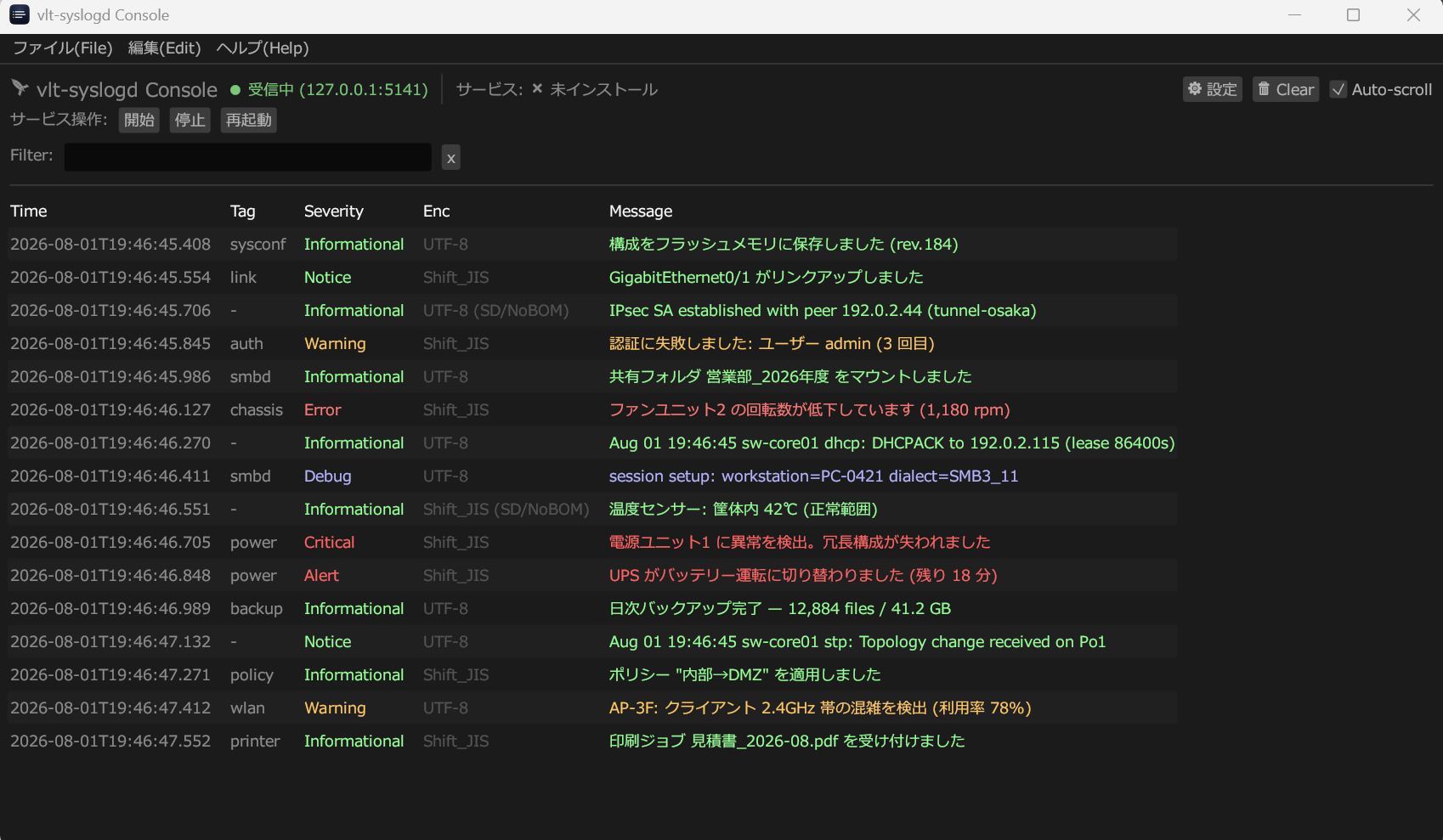
Console does not need to be a service; just open the executable. After the first launch, open ⚙ Settings and check that it points at your Server.
-
Stream address → Server's
stream_addr(default127.0.0.1:5141) -
Control address → Server's
control_addr(default127.0.0.1:5142)
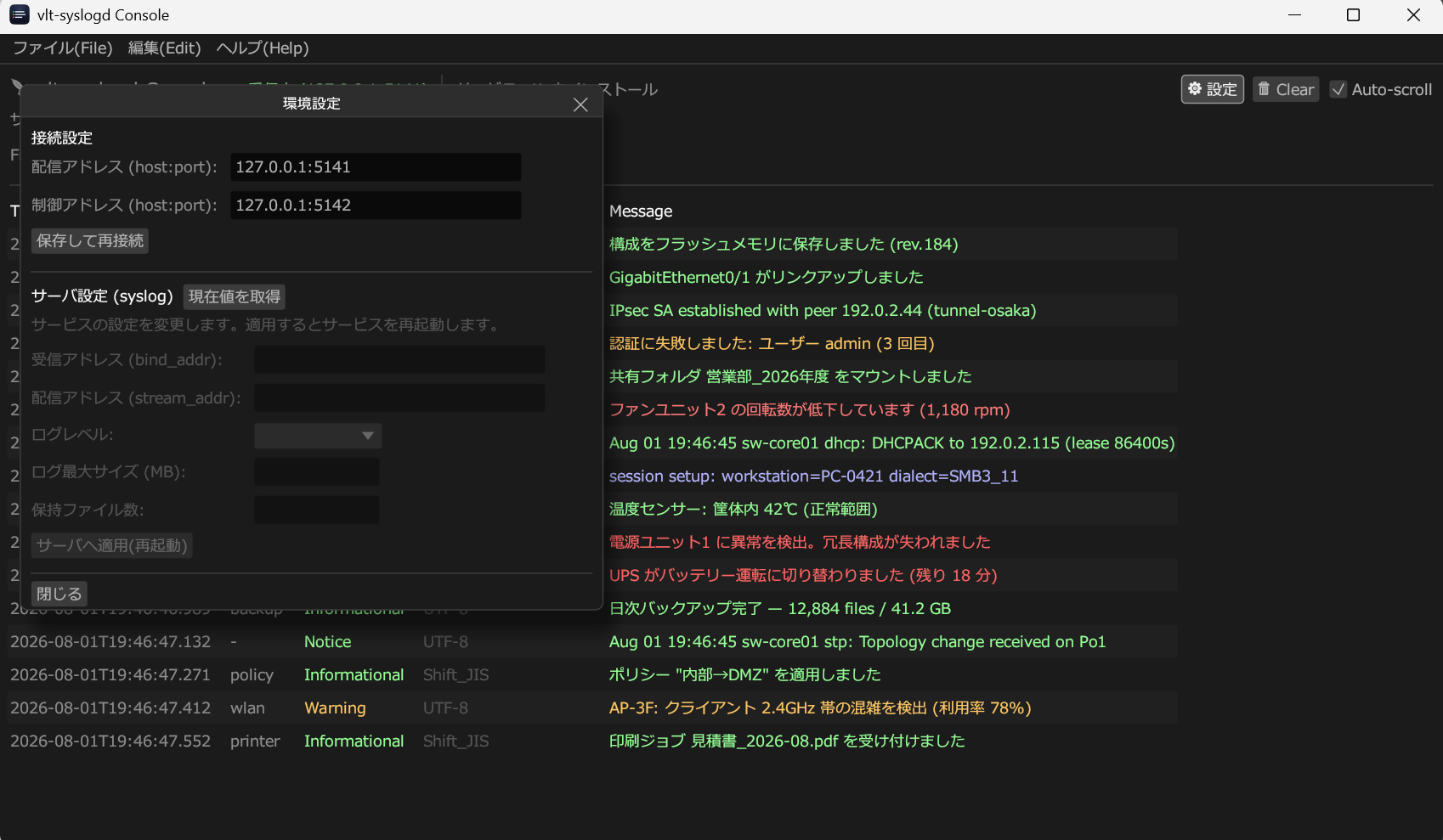
A green ● receiving at the top means the stream channel is live. The service start / stop / restart buttons work when Server was registered by the bundled installer.
- Windows raises UAC; macOS asks for a password or Touch ID. Approving continues the action.
- With no service registered, the action fails immediately with a plain message. Saving the settings still succeeds — only the restart is skipped.
8. Verifying it works
-
Is the service running (as a service, not merely a process)?
sc.exe query vlt-syslogd-srv # Windows sudo launchctl print system/com.veltrea.vlt-syslogd-srv # macOS systemctl status vlt-syslogd-srv.service # Linux -
Is it listening?
Get-NetUDPEndpoint -LocalPort 514 # Windows lsof -nP -iUDP:514 # macOS / Linux -
Send one message locally and watch Console:
printf '<34>Oct 11 22:14:15 myhost myapp: hello' | nc -u -w1 127.0.0.1 514The indicator should turn green and a row should appear.
-
Only if remote devices will send: check reachability from another host on the network. If nothing arrives, check
bind_addr, then the firewall, then the sender's destination address.
9. Uninstalling
cd Server; powershell -ExecutionPolicy Bypass -File .\uninstall-windows.ps1   # Windows (elevated)
cd Server && sudo ./uninstall-macos.sh                                       # macOS
cd Server && sudo ./uninstall-linux.sh                                       # Linux
These stop and deregister the service and remove the executable they placed. Configuration and logs are left in the data directory. Delete it by hand (§11) to remove everything. Portable was never installed, so deleting the file is enough.
10. When something is wrong
| Symptom | Cause and fix |
|---|---|
| Japanese renders as empty boxes |
No CJK font on this Linux system. Install
fonts-noto-cjk or equivalent and restart the app.
|
| macOS says the app is damaged and will not open |
The quarantine flag on an ad-hoc signed download. Right click
→ Open, or
xattr -dr com.apple.quarantine <app>.
|
| It starts but nothing ever arrives | Check the bind result in the first row. If it failed, change the port. If it succeeded, check the sender's destination and the firewall. |
| Console always shows "disconnected" |
Server is not running, or the stream address does not match.
Confirm Server is up and that Console's stream address equals
Server's stream_addr.
|
| "Fetch current values" fails |
Control address mismatch, or an older Server without the
control channel. Check control_addr and
reinstall Server.
|
| Console still reports "not installed" after installing | Happens when the service name or launchd label was changed by hand. Console and the installer must name the same identifier (§11). |
| Service is running but remote logs never arrive |
Running is not the same as reachable. Check (1)
bind_addr is 0.0.0.0 or a LAN IP and
not 127.0.0.1, (2) the firewall allows UDP 514,
(3) the sender points at this machine's real address.
|
| Remote Console cannot connect |
stream_addr and control_addr are
loopback-only by default. Prefer an SSH tunnel. To expose them
directly you need
VLT_SYSLOGD_ALLOW_NONLOOPBACK on the server and
the control token pasted into Console.
|
| Console output is garbled on Windows | The console is CP932. The installer and service are ASCII-only, so this does not affect operation. |
| The install script will not run on Windows |
Open PowerShell as administrator and include
-ExecutionPolicy Bypass.
|
11. Identifiers and paths
| OS | Service identifier | Data directory |
|---|---|---|
| Windows | vlt-syslogd-srv |
C:\ProgramData\vlt-syslogd\ |
| macOS | com.veltrea.vlt-syslogd-srv |
/usr/local/var/vlt-syslogd/ |
| Linux | vlt-syslogd-srv.service |
/var/lib/vlt-syslogd/ |
Environment variables
VLT_SYSLOGD_BIND |
Overrides the listening address of the GUI (Portable). |
VLT_SYSLOGD_DATA_DIR |
Overrides Server's data directory. |
VLT_SYSLOGD_CONSOLE_DATA_DIR |
Overrides where Console keeps its own settings. |
VLT_SYSLOGD_ALLOW_NONLOOPBACK |
Permits non-loopback stream_addr /
control_addr. Refused by default.
|
For the full architecture see the reference, and for per-OS detail see DOCS/.